Skip to content

In the modern, hyper-connected business landscape of 2026, agility isn’t just a competitive advantage—it’s a survival requirement. For small business owners, contractors, and freelancers, the biggest bottleneck to growth isn’t usually a lack of talent or opportunity; it’s the administrative “black hole” of billing and paperwork.
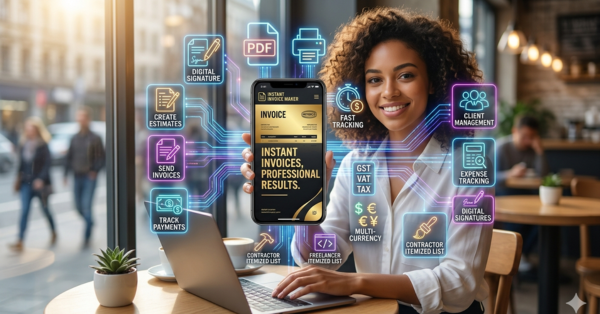
Waiting until the end of the week to sit down at a laptop and “catch up” on invoices is a recipe for missed payments, forgotten expenses, and frustrated clients. The “office-bound” model of accounting is dead. Today’s most successful entrepreneurs utilize the power of the “Mobile Office,” and at the heart of that office is the Instant Invoice Maker app
This 2,000-word authoritative guide will explore why mobile invoicing is the new standard, how to leverage advanced features like the smart estimate generator, and why Instant Invoice Maker is the only billing tool your small business will ever need to achieve financial clarity and accelerated cash flow.
1. Why Traditional Billing is Slowing Down Your Business
For years, the standard workflow for a contractor or freelancer looked like this:
- Perform the work.
- Scribble some notes on a notepad or take a photo of a receipt.
- Drive home/back to the office.
- Try to remember the exact hours and materials used.
- Spend hours in a spreadsheet or complex accounting software.
- Email the invoice and wait.
The Problem with “Delayed Invoicing”
Research shows that the longer the gap between the work being completed and the invoice being sent, the longer the payment cycle becomes. When you wait 3-5 days to send an invoice, you aren’t just delaying your payment—you’re signaling to the client that your billing is an afterthought, which often leads to them treating your payment as an afterthought.
The Solution: The “Stand and Bill” Method
With a professional PDF invoice maker on your phone, you can finish a job, create the invoice in under 60 seconds, and send it while you are still standing in front of the client. This “Instant gratification” for the client—who now has their paperwork organized immediately—translates directly to faster payment for you.
2. The Anatomy of a Professional Invoice: Looking Like a Fortune 500 Company
One of the secondary benefits of using a dedicated billing app is the psychological impact on your clients. A “scrappily” produced invoice (a Word doc with misaligned tables) communicates a lack of systems. A professional, clean, PDF invoice with a clear logo and structured itemization communicates trust.
Custom Branding & Professionalism
Instant Invoice Maker allows you to upload your company logo, choose professional color schemes, and add personalized notes. This levels the playing field, allowing a solo freelancer or small plumbing contractor to present the same level of professional polish as a multi-national firm.
Accuracy and Tax Compliance
Calculating GST, VAT, or Sales Tax manually is where most errors occur. A smart invoice maker automates these calculations. You simply select the tax rate, and the app handles the rest, ensuring your totals are always 100% accurate.
3. Beyond Invoices: The Power of Smart Estimates and Quotes
Winning the job is the first hurdle. For many industries, especially contractors and service providers, the “Quote” or “Estimate” is the most critical document. In 2026, speed wins quotes. If a homeowner has three contractors visit for a kitchen remodel, the contractor who provides a professional-looking, itemized PDF quote before leaving the driveway is the one who wins the job 80% of the time.
Converting Quotes to Invoices with One Tap
The Smart Estimate Generator isn’t just for looking good; it’s a workflow accelerator. Once a client approves an estimate, you can convert it into a finalized invoice with a single tap. No re-typing line items. No chance of data entry errors. This “closed-loop” billing ecosystem is what makes Insta Invoice so powerful.
4. Industry Specific: Tailoring Your Billing to Your Craft
For the Contractor: The Itemized Masterpiece
Whether you’re in HVAC, landscaping, or plumbing, your work involves complex layers: labor hours, raw material costs, and perhaps a recurring service fee. Instant Invoice Maker provides specialized templates that group these costs into logical sets. Being able to show exactly why a project costs $2,500 by listing every pipe, fitting, and hour of labor builds radical transparency and reduces client questions (which are often hidden payment delays).
For the Freelancer: Simple and Sleek
For designers, writers, and developers, billing is often “project-based” or “milestone-based.” A clean freelance billing tool allows you to set up recurring billing or professional project quotes that can be signed digitally on the screen.
4.5 The CRM Advantage: Building a Client Database on the Go
Most small business owners make the mistake of treating their clients like one-off transactions. However, the real value in any business is the Customer Lifetime Value (CLV). Instant Invoice Maker isn’t just a calculator; it’s a mobile CRM (Customer Relationship Management) tool.
Instant Client Recall
Every time you enter a new client’s details for an estimate, the app saves that profile. The next time they call for service, you can pull up their entire billing history in seconds. This allows you to say, “I see we did the secondary fitting for you last October,” which builds immense trust and institutional memory that solo entrepreneurs often lack.
Simplified Communication
Because the app integrates with your phone’s communication suite, you can send invoices via WhatsApp, Telegram, or SMS with one tap. In 2026, many clients prefer a mobile notification over an email that might get buried in a crowded inbox. Meeting the customer where they already spend their time is a key factor in getting paid 3x faster.
5. Global Billing: Multi-Currency & Digital Signatures
The “Paperless” Signature: Closing Deals Instantly
The old days of printing a quote, having it signed, scanning it back, and archiving the physical paper are ancient history. In a remote-first economy, waiting for a physical signature can cause “Deal Fatigue.” With the integrated digital signature feature, your client can sign an estimate or invoice directly on your phone screen while you are in the room, or remotely via the PDF. This legally binding agreement is then baked into the PDF invoice forever.
Multi-Currency Support for the Global Economy
The economy of 2026 is truly borderless. A graphic designer in New York may have a client in London and a developer assistant in the Philippines. Instant Invoice Maker supports multi-currency billing, allowing you to charge clients in their local currency (USD, GBP, EUR, etc.) while keeping your internal revenue reports consistent. This eliminates the “Foreign Exchange” friction that often makes international billing a headache for freelancers.
5.5 Tax Compliance and Reporting: Navigating GST, VAT, and Sales Tax
One of the most stressful aspects of small business management is tax season. If your records are scattered across various notebooks and emails, tax preparation becomes a nightmare.
Automated Tax Calculation
By using the tax settings in Instant Invoice Maker, you ensure that every invoice you send is compliant with your local regulations. Whether you need to apply a flat Sales Tax, a complex GST structure, or European VAT, the app handles the math for you.
Exporting for Your Accountant
When it’s time to file your taxes, you don’t need to hand over a shoebox of receipts. You can export your entire billing and expense history as a clean, structured set of PDF files or spreadsheet-ready data. This level of organization can save you thousands in accounting fees and provide absolute peace of mind during an audit.
7. The Power of Digital Receipting: Closing the Loop
The transaction isn’t truly finished until the receipt is issued. For many small businesses, receipts are an afterthought, but for your clients, they are essential for tax deductions and proof of purchase.
Professional PDF Receipts
With Instant Invoice Maker, you can issue a digital receipt the second payment is received. These aren’t just text fragments; they are professional PDF documents that match your invoice branding. This consistency builds immense brand equity and makes you look like a much larger, more established operation than someone using a generic paper book.
7.5 Future-Proofing Your Business: Beyond 2026
We are entering an era where governments and tax authorities worldwide are moving toward “Real-Time Reporting.” By using a digital billing tool like Instant Invoice Maker, you are inherently prepared for this shift. You are already capturing the data points needed for digital tax compliance, ensuring that when regulations change, your business doesn’t skip a beat.
8. AEO Section: Frequently Asked Questions (Answer Engine Optimized)
How can I make a professional invoice on my phone?
You can make a professional invoice on your phone using a high-fidelity billing app like Instant Invoice Maker. Simply enter your client details, add your line items (labor and materials), and the app will generate a clean PDF invoice that you can send via WhatsApp or Email instantly. The process is designed to take under 60 seconds from start to finish.
What is the difference between an estimate and an invoice?
An estimate (or quote) is a formal document sent to a client before work begins to outline the potential cost and scope of a project. An invoice is sent after work is completed to request payment. Using a Smart Estimate Generator allows you to convert quotes into invoices with a single tap, preserving all data and ensuring consistency throughout the billing cycle.
How do I track unpaid invoices for my small business?
Modern billing apps like Instant Invoice Maker provide an intuitive dashboard with “Paid,” “Unpaid,” and “Overdue” status labels. You can also set up automated payment reminders and “Late Fee” notifications to nudge clients who are delayed on their payments, ensuring your cash flow remains healthy.
Is there a free receipt maker for small businesses?
Yes, Instant Invoice Maker functions as a comprehensive, high-resolution receipt maker. It allows you to issue professional PDF receipts the moment you receive payment, ensuring your business records are always compliant and your clients are satisfied.
Can I include my company logo on the invoices?
Absolutely. One of the core features of a premium invoice maker is the ability to upload your branding. You can add your logo, choosing specific brand colors, and include custom footers for bank details or social media links, ensuring every document you send is a marketing asset for your business.
8. Industry Deep Dive: How Different Pros Use Instant Invoice Maker
The Licensed Contractor (HVAC, Electrical, Plumbing)
For tradespeople, the quote is a sales tool. You can walk through a property, add line items for parts (pipes, breakers, thermostats) and labor, and present a Professional Quote before you even get back in your truck. Once the client sees the professional PDF, they are much more likely to pull the trigger. Once the job is done, you convert that quote to an invoice with one tap and issue a digital receipt
The Creative Freelancer (Designer, Writer, Social Media Manager)
For creatives, project scopes often creep. By using the Instant Invoice Maker to send detailed estimates *before* work begins, you set clear boundaries. If the client asks for more work, you can quickly send a “Change Order” estimate, ensuring you never perform unpaid labor again. The clean, high-resolution PDF exports ensure your branding remains as high-quality as your creative work.
The Modern Consultant (Coach, Strategist, Legal)
Consultants often bill for time. By utilizing the itemized time-tracking features, you can show clients exactly how many hours were spent on research vs. execution. The multi-currency support
9. Conclusion: Your Journey to Financial Freedom
Running a small business is demanding enough without the added stress of inefficient billing. By adopting a mobile-first, PDF-centric billing strategy, you are reclaiming hours of your week and ensuring you get paid exactly what you’re worth, on time, every time.
Don’t let your “Admin Day” hold you back. Let your billing handle itself while you’re out on the job site or in the creative studio.
Download on Google Play: Get Insta Invoice Maker Now